
How to Convert Soap Oil Weights to Percentages and Resize a Blend
Select an image to view it at full size.
To resize an oil blend, add the original oil weights, divide each oil by that total, and apply those proportions to the new oil target. Then recalculate the lye and water using the same ingredient identities and settings. The new target is the weight of oils, not the weight of wet batter or cured soap.
This method lets you preserve a known blend when changing batch size. It does not tell you whether the original formula is suitable or whether a mold will hold the new batch. Those are separate checks.
Put the Original Oils Into One Unit
Start with the complete oil list from the recipe you intend to resize. Do not add its water, NaOH, fragrance or other additives to the oil total. If some oil quantities are in grams and others in weight ounces, convert them to one weight unit before adding them. Soap Draftbook uses 1 weight ounce = 28.349523125 g. A fluid ounce is a volume unit and cannot be substituted for a weight ounce.
For an oil-weight calculation example, take a blend containing 300 g olive oil, 150 g coconut oil and 50 g shea butter. Its oil total is 500 g. These quantities let us follow the same blend through a size change.
Check that each ingredient has a matching entry in the calculator. A named oil is not interchangeable with a similarly named blend or a different variant. If an ingredient is absent, choosing a nearby oil simply to complete the form changes the calculation's assumptions. The current workspace supports 12 listed oils.
Turn Each Oil Weight Into a Percentage
Use oil percentage = individual oil weight ÷ total oil weight × 100.
For the example, olive oil is 300 ÷ 500 × 100 = 60%. Coconut oil is 150 ÷ 500 × 100 = 30%. Shea butter is 50 ÷ 500 × 100 = 10%. Together they total 100%.
| Oil in this example | Original weight | Share of the oil blend |
|---|---|---|
| Olive oil | 300 g | 60% |
| Coconut oil | 150 g | 30% |
| Shea butter | 50 g | 10% |
| Total oils | 500 g | 100% |
These are percentages of oils only. The proportions should not be recalculated using the combined weight of oils, water and lye. If a published formula supplies percentages that include all ingredients, isolate its oils and renormalize their shares before using an oil-percentage calculator.
For instance, a formula might list oils as 45%, 22.5% and 7.5% of its entire ingredient total. Those oil entries add to 75%, so their shares within the oil blend are 45 ÷ 75, 22.5 ÷ 75 and 7.5 ÷ 75: again 60%, 30% and 10%.
Apply the Proportions to the New Oil Target
The calculator result below uses 5% lye discount, 100% nominal NaOH purity and 33% lye concentration. It shows the resized oil weights together with the newly calculated lye and water.
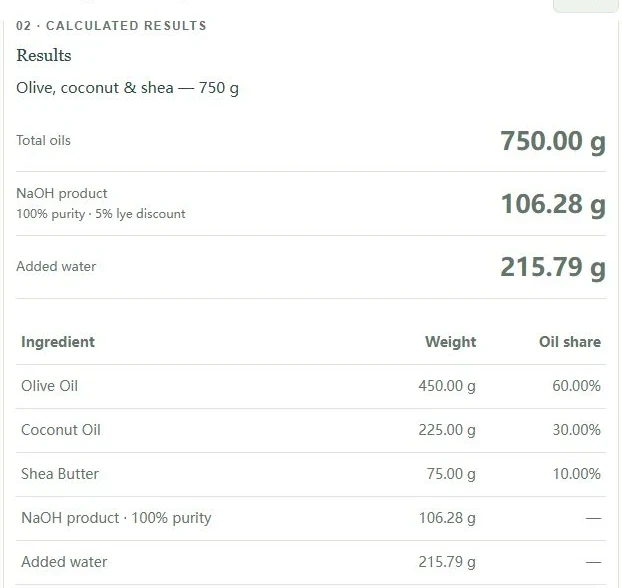
Suppose the new oil target is 750 g. Multiply each fraction by 750: olive oil becomes 450 g, coconut oil 225 g, and shea butter 75 g. The total is 750 g and the proportions remain 60%, 30% and 10%.
The equivalent shortcut is a scale factor: new oil target ÷ old oil total. Here, 750 ÷ 500 = 1.5. Multiplying every original oil weight by 1.5 gives the same result.
Keep precision through the calculation and check the final sum. For a blend containing repeating decimal percentages, rounding every percentage first can introduce avoidable differences. Soap Draftbook keeps full precision internally even when displayed values are rounded.
Recalculate the Complete Result
Open the calculator, enter the original oil weights, and check the result against your source before resizing. Preserve the lye-discount, purity and water-basis settings you intend to use.
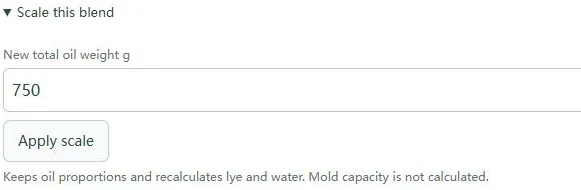
Expand Scale this blend, enter the new total oil target, then select Apply scale. Entering a target alone does not apply the change. Alternatively, choose Percentage, enter the oil shares and specify the total oil target. Read the resulting oil weights, NaOH product weight and added water together; do not resize the oils and leave an old lye amount beside them.
For a pure size change, the same oils, SAP reference, lye discount, purity and water setting should produce proportional calculated weights. If they do not, compare those inputs before treating the difference as a rounding issue. Saving the original as a baseline lets you inspect a variation without relying on memory.
Changing an oil at the same time creates a different formulation task. The old lye figure is no longer the appropriate starting point for that changed blend. Calculate again from the exact new oils, rather than scaling the original lye quantity and assuming the substitution cancels out.
Choose the Target Before Resizing for a Mold
A mold's advertised “capacity” may describe volume or a weight of soap batter. Neither is automatically an oil-weight target. Batter contains the oils plus lye and water, with any further additions also needing consideration. The calculator's pre-additive total is not cured soap weight.
Modern Soapmaking's mold-sizing guide explains why volume-to-oil multipliers vary with the formula and water amount. Treating one multiplier as exact for every blend can therefore mis-size a batch.
If the supplier provides an oil-weight capacity for the relevant mold and recipe conditions, use that information as the starting point. Otherwise, establish a suitable oil target through an appropriate mold-sizing method before following this resizing guide. A numeric oil target in this calculator does not measure the mold or verify a fill height.
Save the Resized Blend with Its Assumptions
Give the resized copy a recognizable name and note the original oil total, new target and reason for the change. For example: “750 g oil target; scaled from 500 g; ingredient identities and water basis unchanged.” That note is more useful than simply calling it a larger batch.
Review the complete result before using the weighing view. A printable or CSV weighing sheet captures the selected quantities, while a JSON library backup preserves the recipe records for reopening. See saving versions and backups for the difference between those files.